

 Hai Nguyen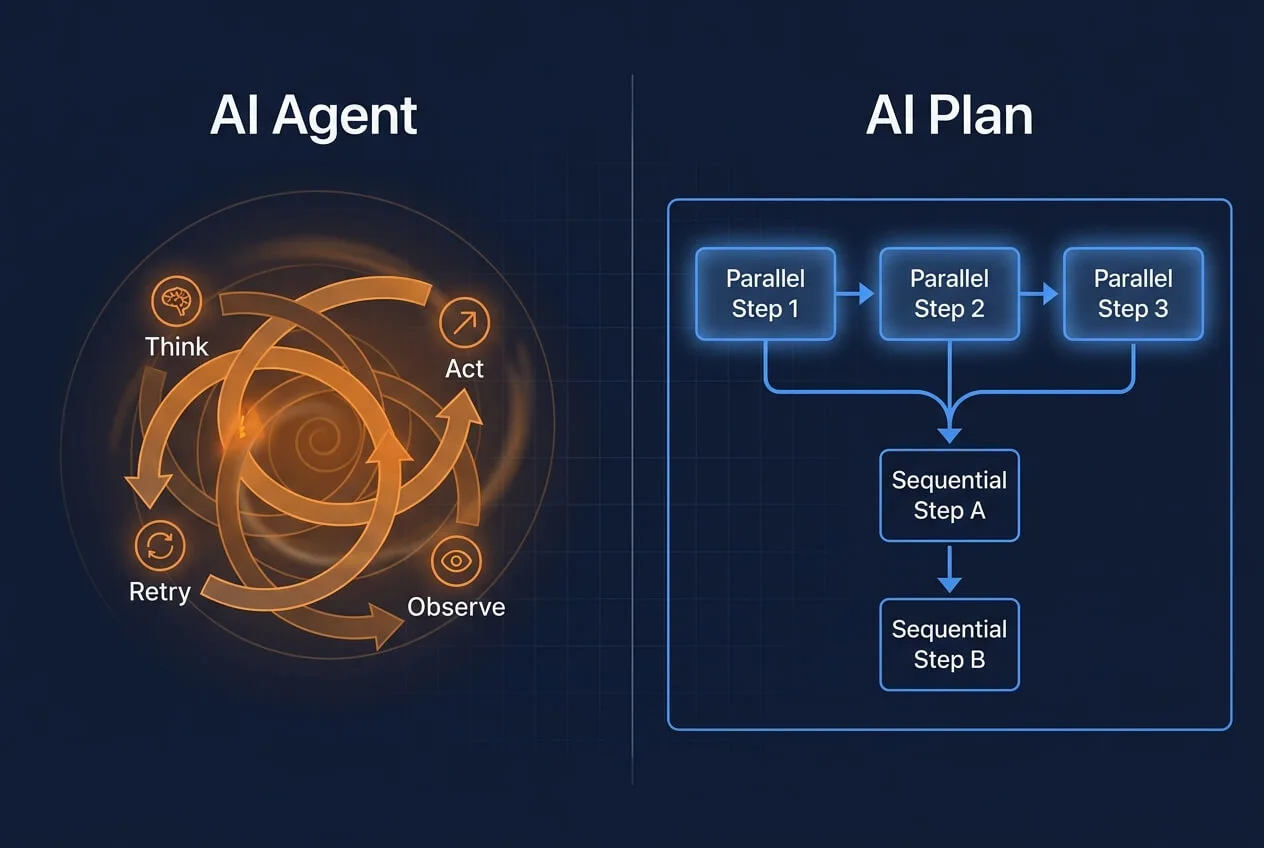
The Demo Works. The Production Run Does Not.
Every AI agent demo looks the same. The AI is given a goal, it reasons through a sequence of tool calls, and it delivers the answer in a dramatic multi-step loop. Impressive. Then you try to use it in production and it hallucinates a tool call halfway through, loops three extra times, and returns something that is roughly right - structurally different from last time.
This is not a model quality problem. It is an architectural one.
AI agents and AI Plans are two fundamentally different approaches to AI workflow automation. Agents decide everything at runtime. Plans execute a deterministic workflow you define in advance - with steps that run in sequence, in parallel, or both. Knowing which to use, and why, is one of the most practical skills a developer or knowledge worker can develop right now.
What an AI Agent Actually Is
An AI agent follows a loop: it receives a goal, reasons about what to do next, calls a tool or takes an action, observes the result, and repeats until it decides the goal is met.
This architecture is genuinely powerful when:
- The path to the answer is unknown upfront
- The task requires exploring information to decide what to do next
- The AI needs to use tools dynamically based on what it finds
- The cost of a wrong detour is low and self-correction is acceptable
A good example: “Debug this error in my codebase.” The agent reads the error, decides which files to inspect, reads them, forms a hypothesis, checks related code, and proposes a fix. You could not have written those steps in advance - the agent needed to discover them.
Agents for Askimo are called Skills. They delegate to real CLI runtimes - Gemini CLI, Claude Code, Codex CLI - which run directly on your local project files with full file system and terminal access. For open-ended exploration of a codebase or repository, this is the right tool.
Where Agents Fail
Agents have a structural problem that better models have not solved: they decide everything at runtime.
When the AI decides what steps to take, how many, and when to stop, the following issues emerge in practice:
Non-deterministic output structure. Run the same agent twice on the same input and you get structurally different output. That is fine for exploration. It is not acceptable when a downstream process, a colleague, or a client expects a consistent format.
Opaque reasoning. You see the input and the final output. What happened in between - which tools were called, what assumptions were made, what was discarded - is invisible unless you dig into traces. Auditing an agent run is slow and technical.
Error propagation. One bad tool call or hallucinated intermediate result does not stop the agent. It carries forward into every subsequent step. By the time you see the final output, the original error may be deeply embedded.
Cost unpredictability and retry loops. Agents retry when they are uncertain. They re-read context, reconsider tool calls, and sometimes get stuck in a loop trying to satisfy a goal they cannot cleanly reach. A task you expected to cost $0.05 in tokens can cost $0.50 or more if the agent spirals. Unlike a deterministic workflow where each step runs exactly once, an agent loop has no natural ceiling on how many iterations it takes. In the worst case, the agent retries the same failing action repeatedly until it hits a token limit or timeout, consuming resources without making progress. Some implementations - Claude tool use, OpenAI Assistants - add explicit retry limits and token caps as guardrails. That helps, but it caps the damage rather than eliminating the root cause. Plans remove the problem structurally: every step runs exactly once, in order, at a known cost.
Ambiguous completion. Agents decide when they are done. Sometimes they stop too early. Sometimes they keep going past the point where the task was actually complete.
None of these are theoretical. Ask anyone who has tried to build a reliable production workflow on top of an agent framework.
What a Plan Is
A Plan is a structured AI workflow you define in advance, where each step has a focused job and outputs are passed automatically between steps. Steps can run in sequence or in parallel depending on whether they depend on each other.
You specify:
- What inputs the user provides
- What each step does and what order or structure it runs in
- What persona or role the AI adopts for each step
- How outputs are passed between steps
Sequential steps are used when each step needs the output of the previous one as context. A risk analysis needs the financial profile. A recommendations brief needs both. The order matters and is enforced.
Parallel steps are used when steps are independent of each other. Researching competitor pricing, features, and customer reviews simultaneously produces the same quality output in a fraction of the time. Once all parallel steps finish, a final synthesis step pulls everything together.
The AI fills in the substance at each step. You control the structure. The result is the same shape every time, because the workflow is deterministic even though the content is generated.
This is not a limitation. It is the point.
The Mental Model
Here is the clearest way to think about it:
Use an agent when you do not know the path. Use a Plan when you know the path but not the content.
An agent figures out what steps to take. A Plan executes your steps with AI filling in the substance at each one. Neither replaces the other - they solve different problems.
A debugging agent is the right tool because no one knows in advance which files are relevant. A competitive analysis Plan is the right tool because everyone knows the structure in advance: market overview, competitor profiles, gap analysis, strategic recommendations.
Collapsing that second type of task into an agent produces unpredictable output at unpredictable cost. Running it as a Plan produces consistent, structured, auditable output every time.
Why Most AI Workflow Automation Tools Got This Wrong
Almost every AI tool in 2024 and 2025 shipped agents as the primary abstraction. There are a few reasons for this:
Agents are better demos. Watching an AI autonomously reason and act is dramatic. Watching it fill in step 3 of a predefined workflow is not. Demo quality matters for funding, press, and early adoption.
Agents are architecturally simpler to ship. A ReAct loop is a straightforward implementation. A reliable sequential pipeline with state management, output passing, and step-level validation is more engineering effort. Paradoxically, the less powerful default was faster to build.
The production failure mode is delayed. Agents look fine in controlled tests. They fail at scale, on edge cases, and under the pressure of real users. By the time teams discover this, the tool has shipped.
Workflow tools existed but were the wrong category. n8n, Zapier, Make - these do sequential workflows, but they are integration platforms aimed at operations teams, not AI-first interfaces for developers and knowledge workers. Nobody bridged the gap between AI chat and deterministic AI workflow automation until tools like Askimo Plans.
The result: a generation of tools where agents are the default regardless of whether the task calls for exploration or execution.
AI Agents vs AI Plans: When to Use Each
Use an agent (Skill) when:
- You are exploring an unfamiliar codebase to understand structure or find bugs
- The task requires discovering information before you know what to do with it
- You need the AI to decide which tools to call based on what it finds
- The output is an action (a code change, a file written) rather than a document
- Iteration and self-correction are part of the expected process
Use a Plan when:
- You run the same type of task repeatedly (weekly reports, code reviews, research briefs)
- The output structure needs to be consistent so others can rely on it
- You want each reasoning step to be inspectable and re-runnable independently
- The task has known stages that build on each other (research to analysis to recommendation)
- Some steps are independent and can run in parallel to save time
- You need cost predictability across runs
- The output will be exported, shared, or acted on by someone else
The clearest signal for a Plan: if you could draw the steps on a whiteboard before running the task, it is a Plan. If you cannot, it is probably an agent.
How Askimo Implements Both
Askimo ships both abstractions as first-class features.
Skills are the agent path. You attach a Skill to a conversation or project, and Askimo delegates to the selected CLI runtime (Gemini CLI, Claude Code, or Codex CLI) which operates directly on your local files with actual terminal access. Not a sandbox. Not a simulation. The agent reads, writes, and runs code on your real project directory with your review before any changes land.
Askimo also lets you import Skills directly from a GitHub repository URL. The Claude Code and Gemini CLI communities have produced a growing library of reusable Skills - code auditors, test generators, documentation writers, refactoring agents - that you can import into Askimo with a single paste. Search GitHub for Claude Code skills or Gemini CLI prompts, copy the repository or raw file URL, and Askimo pulls it in ready to run against your own projects.
Plans are the controlled workflow path. You define the steps, or describe what you want in plain English and let Askimo generate the YAML for you, and the workflow runs end-to-end with a single click. Steps can run in sequence (when each step depends on the previous output) or in parallel (when steps are independent and can run simultaneously). Each step’s output is passed automatically to wherever it is needed. When the run finishes, you have a structured result that reflects staged reasoning, not a single prompt fired at once.
The same Askimo session can contain both. You might run a Plan to produce a competitive analysis, then attach a Skill to explore a codebase mentioned in the output. The tools coexist because the tasks they solve are genuinely different.
Can You Just Give an Agent Detailed Instructions?
This is a fair question. If you write a Skill prompt like “Step 1: read package.json. Step 2: list all dependencies. Step 3: check each for vulnerabilities. Step 4: write a report” - the agent will broadly follow that sequence. So what is the difference?
The agent still decides at runtime whether to follow your steps exactly, skip one it thinks is unnecessary, add extra steps it considers helpful, or retry a step that did not satisfy it. Your instructions are a strong hint, not a contract.
A Plan step is a strict contract: it runs exactly once, produces output in the format you defined, and passes it forward. You can write detailed instructions into a Skill and get close to Plan-like behaviour for simple tasks. But the difference matters most when the output needs to be consistent enough to share, export, or compare run to run. An agent with detailed instructions is still non-deterministic at the edges. A Plan is not.
The other practical difference: Skills are built for action (reading files, running code, writing changes). Plans are built for output (reports, analyses, briefs). Even if a Skill follows your steps precisely, it is the wrong tool when what you need is a clean, exportable document rather than a set of file system operations.
A Concrete Comparison
Task: produce a competitive analysis of a new market entrant
With an agent: The agent reads about the company, browses some sources, decides to look at pricing, checks a few competitors, forms a view, and writes something. The output is different each time. The structure changes. The depth varies. You cannot easily compare this week’s run to last week’s.
With a Plan:
- Steps 1a, 1b, 1c run in parallel: research the entrant’s pricing, features, and customer reviews simultaneously
- Step 2 (waits for 1a+1b+1c): Competitive analyst maps the entrant against existing players using all three inputs
- Step 3 (waits for step 2): Risk analyst identifies threats and opportunities for your position
- Step 4 (waits for step 3): Strategist synthesizes into a recommendations brief
The parallel steps cut total run time significantly. Every run still produces the same structure. Every section is traceable to the inputs that produced it. The output is ready to share. The cost is predictable. The diff between this week’s run and last week’s is immediately visible.
The Skill and the Plan Are Not Competing
The mistake is thinking you have to choose a side. The practical answer is:
- Use Plans for everything where structure and repeatability matter
- Use Skills for everything where exploration and autonomy are necessary
Most professional tasks are Plans. Most debugging and investigation tasks are Skills. A well-designed AI workflow uses both - a Plan to structure the analysis, a Skill to explore the repository, back to a Plan to synthesize and deliver.
Askimo is built around that combination. Not because agents are bad or Plans are always better, but because different tasks need different tools and professionals deserve both in the same interface.
Try It
Askimo Desktop is free to download and works with OpenAI, Claude, Gemini, Ollama, and other providers. Plans, Skills, RAG, and MCP tools are all included.
Download Askimo Desktop and run your first Plan or Skill in under five minutes.
The built-in plan library covers investment research, resume tailoring, competitive analysis, and more. You can also describe any workflow in plain English and Askimo generates the Plan for you.
For Skills, you are not limited to what ships with Askimo. The Claude Code and Gemini CLI communities on GitHub have published hundreds of reusable agent Skills. Find one you want, paste the GitHub URL into Askimo, and it imports ready to run against your local projects.
To see Plans in action with real examples, read how to use them for two practical workflows:
- How to Research Any Stock with AI in 2026 (Step-by-Step) - a 4-step plan that profiles a company, stress-tests the financials, assesses risk, and writes a professional investment brief automatically
- AI Resume Tailor: How to Customize Your Resume for Every Job in Minutes - a 4-step plan that analyses a job description, maps your experience against it, rewrites your resume, and generates a tailored cover letter opener
Support Askimo on GitHub
Askimo is an open-source project built to help people work more effectively with AI.
If you find Askimo useful, please consider visiting the GitHub repository and giving it a star ⭐. Your support helps the project grow and encourages continued development.
Frequently Asked Questions
What is the difference between AI agents and AI Plans? An AI agent decides at runtime what steps to take, which tools to call, and when to stop. Useful for open-ended exploration. An AI Plan is a structured workflow you define in advance where the AI fills in the content at each step. Steps can run in sequence (when each depends on the previous output) or in parallel (when steps are independent). The structure is fixed; the content is generated. Agents are non-deterministic by design. Plans are deterministic by design.
When should I use an AI agent? When the path to the answer is unknown upfront, when the task requires discovering information before deciding what to do with it, or when the output is an action (a code change, a file written) rather than a document. Debugging, codebase exploration, and open-ended research are good agent use cases.
When should I use an AI Plan? When you run the same type of task repeatedly, when the output needs a consistent structure, when you want each reasoning step to be inspectable, or when the task has known stages that build on each other. Competitive analysis, investment research, code review reports, and content workflows are good AI Plan use cases. Plans support both sequential steps (each depending on the previous output) and parallel steps (independent steps running simultaneously for faster results).
Can I just give an agent detailed step-by-step instructions instead of using a Plan? You can, and it will broadly work for simple tasks. But the agent still decides at runtime whether to follow your steps exactly, skip one, add extras, or retry. Your instructions are a strong hint, not a contract. A Plan step runs exactly once, produces output in the shape you defined, and passes it forward. The difference matters most for output that needs to be consistent, exportable, and comparable across runs.
Why do AI agents fail in production? Agents fail in production for several compounding reasons: non-deterministic output structure makes results unpredictable across runs; error propagation is invisible as a bad intermediate step carries silently into the final output; and retry loops drive token costs far beyond expectations. When an agent cannot cleanly satisfy a goal, it retries - re-reading context, calling tools again, reconsidering its approach - sometimes cycling through the same failing action repeatedly until it hits a token limit or timeout. These are architectural issues, not model quality issues. Deterministic workflows avoid them by fixing the structure in advance and running each step exactly once.
Does Askimo support both agents and Plans? Yes. Skills are Askimo’s agent feature. They delegate to real CLI runtimes (Gemini CLI, Claude Code, Codex CLI) that operate on your local project files. You can also import Skills directly from GitHub - the Claude Code and Gemini CLI communities have published reusable agent Skills you can paste a URL to import. Plans are Askimo’s deterministic workflow feature. You define the steps, the AI fills in the content, and the result is consistent every time. Both are included in the free desktop app.
Can I build my own Plan in Askimo? Yes. You can describe the workflow you want in plain English and Askimo generates the YAML Plan for you. You can also edit existing Plans from the built-in library or build one from scratch in the Plan editor. No technical knowledge required to get started.
Which is better for a developer: Plans or Skills? Both, for different tasks. Use Skills when you need an agent to explore and act on your codebase - reading files, running code, suggesting changes. Use Plans when you need structured output from a repeatable workflow - code review reports, architecture analysis, documentation generation. Askimo is designed to support both in the same session.