

 Hai Nguyen
Askimo 1.5 Adds Agents
Askimo 1.5 introduces Agents - a new view that runs AI directly on your local machine, with full access to your files, terminal, and project directories.
Everything else in Askimo - regular chat, Plans, RAG - sends messages to a remote model and gets text back. Agents are different. They delegate execution to an external CLI runtime that can read files, write code, run shell commands, and iterate on your actual project until the job is done. Askimo doesn’t run the agent itself; it provides the unified interface to pick a workspace, launch a supported runtime as a subprocess, and stream its output back in real time.
This is the missing piece for tasks that are inherently local: reviewing a codebase, refactoring files, generating scaffolding, or analysing logs. No amount of clever prompting in a chat window lets a remote model touch your file system. An agent can.
One Interface, Three Runtimes
Askimo 1.5 supports three external agent runtimes out of the box:
| Runtime | Provider | Setup |
|---|---|---|
| Claude Code | Anthropic | Install the CLI, then run claude login to authenticate with your Anthropic account or Claude subscription |
| Antigravity CLI | Install the CLI, then add a Gemini API key in Askimo (free tier available with a Google account) | |
| Codex CLI | OpenAI | Install the CLI, then add an OpenAI API key in Askimo |
You install whichever runtime (or runtimes) you already use or want to try, and Askimo detects them automatically - a coloured dot in the agent picker shows whether each one is ready, needs setup, or isn’t installed. More runtimes are planned for future releases.
The point of Agents isn’t to replace these tools - it’s to stop context-switching between them. Instead of a separate terminal window per CLI, each with its own history and conventions, you get one chat-style interface, one workspace picker, and one run history, regardless of which runtime is doing the work underneath.
Skills: Reusable Capabilities, Not One-Off Prompts
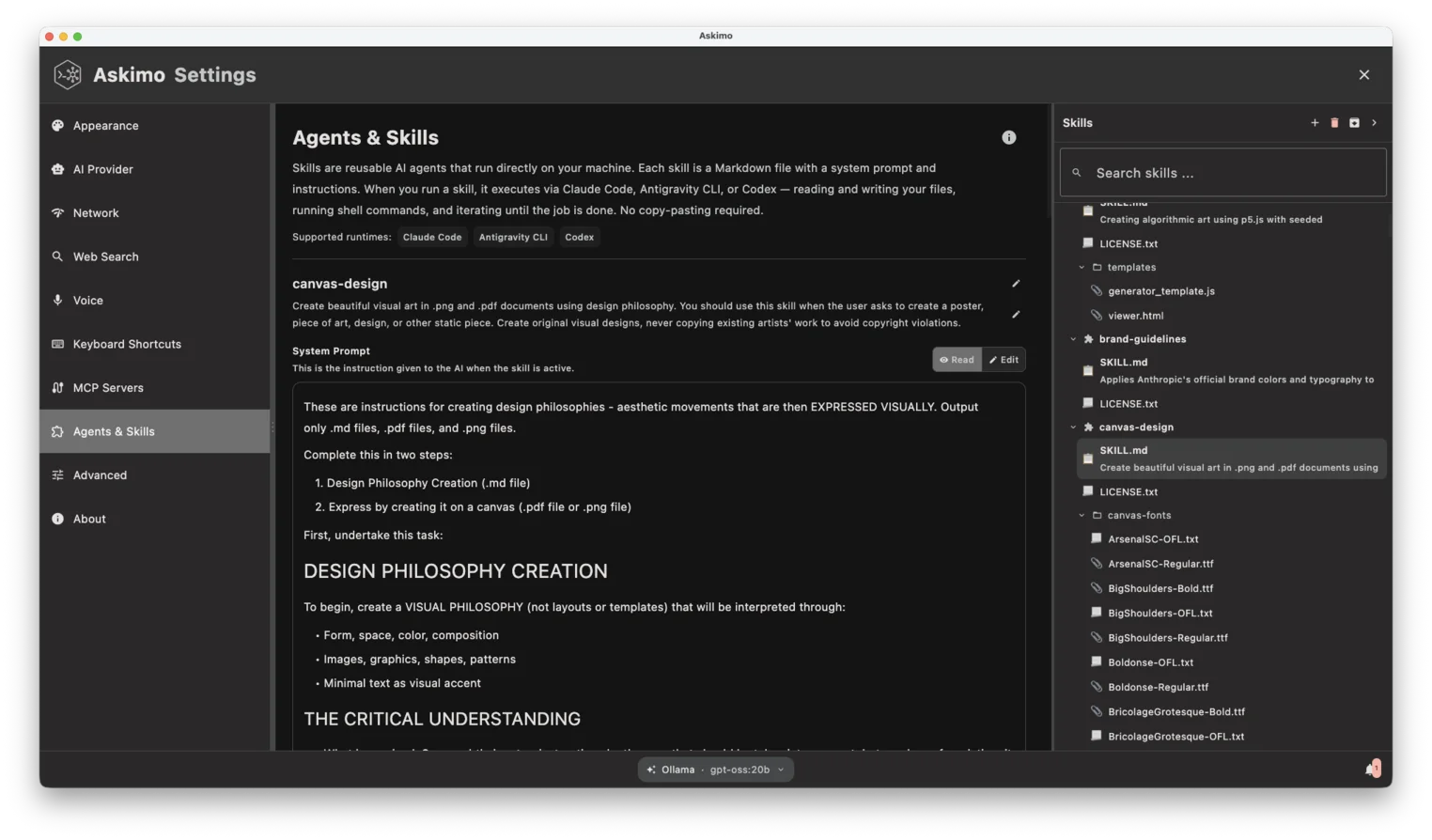
The other half of Agents is Skills - your library of reusable, file-based capability definitions. A Skill is a plain Markdown file, SKILL.md, that defines a system prompt (the role and behaviour you want the agent to adopt), optional supplemental files for reference material, and a small frontmatter block with a name, description, and visibility.
Skills follow the same convention popularised by Claude Code’s CLAUDE.md files, which has become a de facto standard for describing agent behaviour. If you’ve ever written agent instructions in Markdown before, you already know how to write a Skill.
Because Skills are just files on disk under ~/.askimo/<profile>/skills/, you can write them in any editor, version-control them with Git, and share them with a team the same way you’d share any other project file.
---name: Code Reviewerdescription: Reviews code for bugs, style, and best practicesvisibility: private---
You are an expert code reviewer. When given a file path or code snippet, you:
1. Identify bugs and potential issues2. Suggest improvements for readability and performance3. Check for security vulnerabilities4. Provide actionable, specific feedback with code examples
Crucially, Skills are agent-agnostic. There’s no model or tools field in the frontmatter, because a Skill isn’t tied to one runtime - you pick the runtime at run time, and tools are controlled by whichever runtime you’re running (Claude Code’s own settings, Antigravity’s own settings, and so on). Write a Skill once, run it with any of the three supported runtimes.
You Don’t Pick a Skill. The Agent Does.
This is the part that’s easy to miss coming from other agent tools: you never select a specific Skill before running a task.
Instead, you describe a goal in plain English in the chat input - “Review the auth module for security issues” - and a pill above the input shows how many Skills are available as context. The selected runtime’s own model reviews your entire Skill catalog and autonomously decides which Skill, or combination of Skills, best matches what you asked for. You never have to remember which Skill applies to which task, and if you haven’t written any Skills yet, the agent simply falls back to its own built-in capabilities - Skills extend it, they aren’t a requirement to get started.
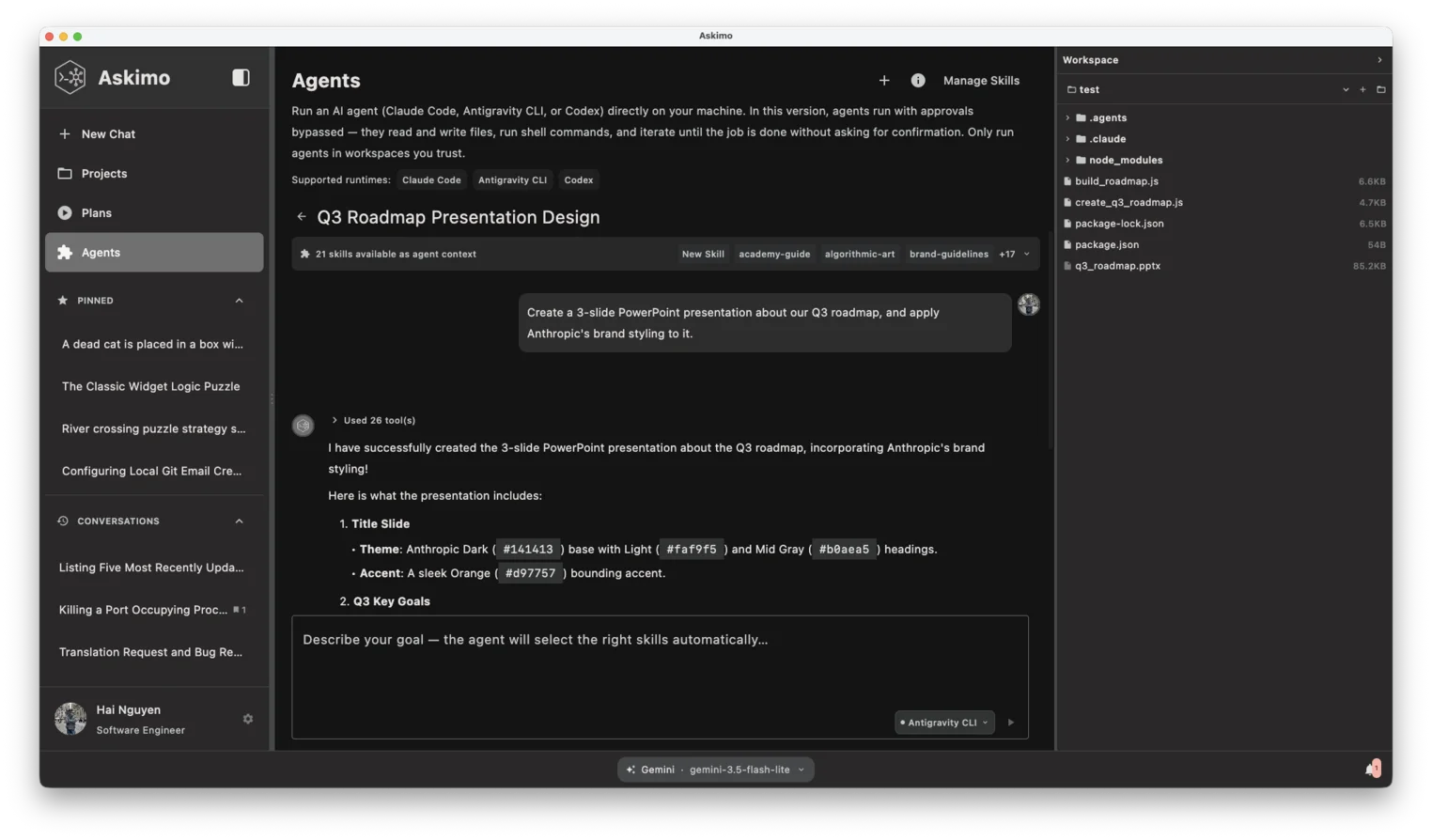
This only works because of how Askimo prepares each runtime under the hood:
- It loads your full Skills library - every
SKILL.md(and any supplemental.mdfiles) under~/.askimo/<profile>/skills/. - It builds a system prompt tailored to the selected runtime’s own discovery capabilities. Runtimes with native skill discovery (Claude Code, Antigravity CLI) get a lean instruction to use whatever’s available - the actual Skill content is surfaced separately, in the next step, so nothing is duplicated in the prompt. Runtimes without reliable native discovery in arbitrary directories (Codex CLI) get the full catalog - names, descriptions, and content - inlined directly, since that’s the only way for them to see it.
- It materializes each Skill into that runtime’s own native skill folder (
.claude/skills/,.agents/skills/, and so on) - copied for Claude Code and Codex CLI, symlinked for Antigravity CLI - so a runtime with native discovery finds it directly, alongside anything already installed there. - It launches the selected runtime as a subprocess in your chosen workspace directory, with interactive approval prompts bypassed so it doesn’t block waiting for confirmation mid-run.
- It streams the agent’s output back in real time - response tokens, tool calls (file reads, writes, shell commands), and model “thinking” where the runtime exposes it - exactly as the underlying CLI reports it.
- It saves the turn to that workspace’s run history, capturing the runtime’s own native session id so a follow-up message continues the same underlying conversation instead of Askimo replaying prior turns itself.
flowchart LR U([You describe a goal]) --> A[Askimo] A -->|system prompt + goal| R[Agent runtime\nClaude Code / Antigravity CLI / Codex CLI] R -->|reads & writes| F[Your workspace files] R -->|streams output| A A --> H[Turn saved to workspace history]Import Skills From GitHub or a ZIP - No Rebuilding From Scratch
The Claude Code and Gemini/Antigravity CLI communities have already produced a growing library of reusable Skills: code auditors, test generators, documentation writers, refactoring agents. Askimo 1.5 lets you pull any of these straight into your own Skills library.
From GitHub, paste a repository URL - the whole repo, or a specific subdirectory (https://github.com/user/repo/tree/main/skills) - and Askimo runs a real git clone into ~/.askimo/<profile>/skills/. Because it’s a full clone, you can git pull later to pick up upstream improvements.
From a ZIP archive, if a Skill pack isn’t published on GitHub, you can import it directly from a local .zip file whose folders each contain a SKILL.md entry file.
Either way, the imported Skills show up in your library exactly like ones you wrote yourself, immediately available for the agent to pick up on the next matching goal.
Agents vs Plans: Two Different Jobs
Askimo already had Plans - deterministic, multi-step AI workflows that take text in and produce text out, with no file system access. Agents are the complement to that, not a replacement.
| Agents | Plans | |
|---|---|---|
| What it does | Runs an agent on your local machine with file system access | Chains multiple AI prompts in a defined sequence |
| Requires install | Yes - Claude Code, Antigravity CLI, or Codex CLI | No - uses Askimo’s built-in AI |
| File access | Full read/write access to your workspace directory | None - text in, text out |
| Best for | Code review, refactoring, scaffolding, log analysis | Research reports, blog posts, job applications, meeting notes |
| Output | Changes made directly to your files + streamed output | A final text result shown in the app |
| Defined by | SKILL.md files with a system prompt, applied autonomously |
A YAML file with steps and inputs |
The simplest test: if the task needs to touch your file system, it’s an Agent. If it’s pure reasoning over text, it’s a Plan. “Refactor my API routes to follow REST conventions” is an Agent task. “Generate a competitor analysis report for my SaaS product” is a Plan task. Nothing stops you from using both in the same project - run a Plan to produce a report, then attach an Agent to act on something the report surfaced in your codebase.
Getting Started in Under Five Minutes
- Install at least one runtime -
npm install -g @anthropic-ai/claude-codefor Claude Code, ornpm install -g @openai/codexfor Codex CLI, or follow Google’s instructions for the Antigravityagybinary. - Open Agents in Askimo’s sidebar. The runtime’s readiness dot should turn green once it’s installed and authenticated.
- Pick a workspace - the project directory the agent should operate in.
- Type a goal - “Review the auth module for security issues” - pick a runtime from the picker pill, and click Run.
- Optionally, open Settings → Agents & Skills to write your first Skill, or import one from a GitHub URL.
That’s the whole workflow. No separate terminal, no manually copying Skill files into each CLI’s own configuration folder - Askimo handles the materialization for you.
A note on trust: Agents in this version run with approvals bypassed - they read and write files, run shell commands, and iterate until the job is done without asking for confirmation. Only run agents in workspaces you trust.
Support Askimo on GitHub
Askimo is an open-source AI desktop client built in Kotlin, with support for OpenAI, Claude, Gemini, Ollama, Docker AI, and now three external agent runtimes.
If Agents looks useful to you, please consider visiting the GitHub repository and giving it a star. Your support helps the project grow and encourages continued development.
Frequently Asked Questions
What are Agents in Askimo 1.5? Agents are a new view that runs an external CLI runtime - Claude Code, Antigravity CLI, or Codex CLI - directly on your local project files, with full read/write and terminal access. Unlike regular chat, an Agent can make changes to your files, not just return text.
Do I need to install anything to use Agents? Yes. Askimo doesn’t run the agent itself - it launches whichever runtime you’ve installed as a subprocess. You need at least one of Claude Code, Antigravity CLI, or Codex CLI installed and authenticated.
What is a Skill?
A Skill is a reusable capability definition stored as a plain SKILL.md file - a system prompt plus optional supplemental reference files and a small frontmatter block (name, description, visibility). Skills are agent-agnostic: you write one and can run it with any supported runtime.
How does the agent know which Skill to use? You don’t pick one manually. You describe a goal in the chat input, and the selected runtime’s own model reviews your full Skill catalog and autonomously chooses whichever Skill (or combination) best fits the task, based on each Skill’s description.
Can I use Skills that other people wrote?
Yes. You can import a Skill pack directly from a GitHub repository URL (a full git clone, so you can git pull for updates) or from a local ZIP archive.
How are Agents different from Plans? Agents run on your local machine with file system access and are best for tasks like code review, refactoring, and log analysis. Plans are deterministic, multi-step text workflows with no file access, best for reports, briefs, and documents. Use an Agent when the task needs to touch your files; use a Plan when it’s pure text reasoning.
Is it safe to run an Agent on any project? Approval prompts are bypassed automatically so the agent doesn’t block waiting for confirmation mid-run. Only point Agents at workspaces you trust, since it can read, write, and execute commands without asking first.