

 Hai Nguyen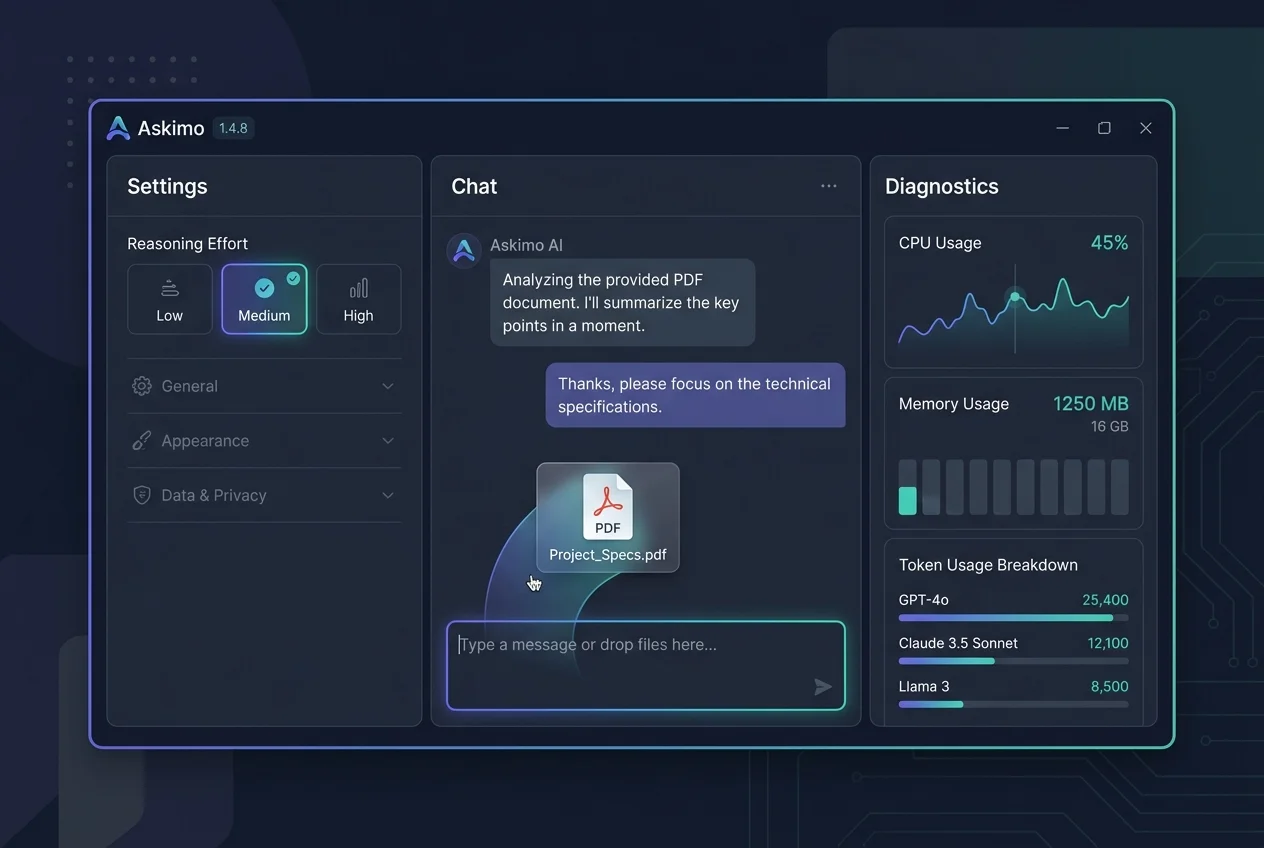
Askimo 1.4.8 Is Now Available
Askimo 1.4.8 is a focused quality release that gives you more control over how AI thinks, how the application looks, and how it behaves under the hood.
This version introduces configurable Reasoning Effort levels so you can balance response quality against speed, deeper UI customization with font and palette options, and a new system diagnostics dialog for better visibility into performance and token usage. It also includes Anthropic prompt caching, drag-and-drop file support, and a series of stability and consistency improvements across the interface.
Control How Hard the AI Thinks
Not every question needs the same level of analysis.
A quick factual lookup needs a fast, direct answer. A complex technical decision or a nuanced piece of writing benefits from more careful reasoning. Previously, the AI applied the same processing approach to every request regardless of what the task required.
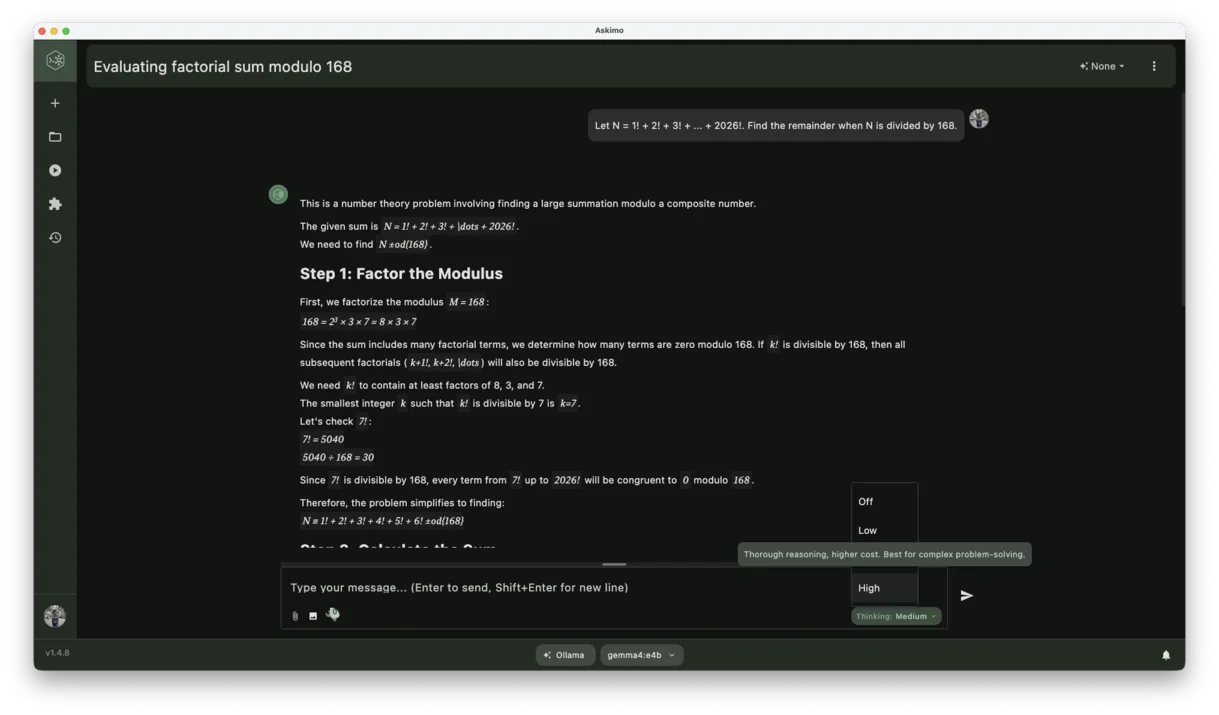
Askimo 1.4.8 introduces configurable Reasoning Effort levels directly in the chat input. A small control sits in the chat bar so you can adjust reasoning depth before sending each message, without opening any settings panel.
You can choose from:
- Low for fast, lightweight responses to simple questions
- Medium for balanced speed and quality on everyday tasks
- High for deeper analysis on complex or high-stakes requests
The control is per-model, so different models in your setup can have different defaults. This is particularly useful if you work with a mix of fast local models and more capable cloud models.
For code review, technical writing, or research, a higher reasoning level can noticeably improve response quality. For quick lookups or simple summaries, a lower level keeps things fast.
Faster Responses With Prompt Caching, Now Including Anthropic
Repeated or overlapping context is one of the most common sources of unnecessary latency in AI conversations.
Askimo has supported prompt caching for several AI providers for some time. With 1.4.8, Anthropic is now fully supported, completing the picture across all major providers.
When the same context appears again in a conversation, the model can reuse the cached portion instead of reprocessing it from scratch. If you are working within a project, referencing the same document multiple times, or continuing a long conversation, this means faster responses on follow-up questions and lower processing overhead regardless of which provider you are using.
Whether you work with OpenAI, Anthropic Claude, Gemini, or a locally hosted model, prompt caching now works consistently across your setup.
Attach Files With Drag and Drop
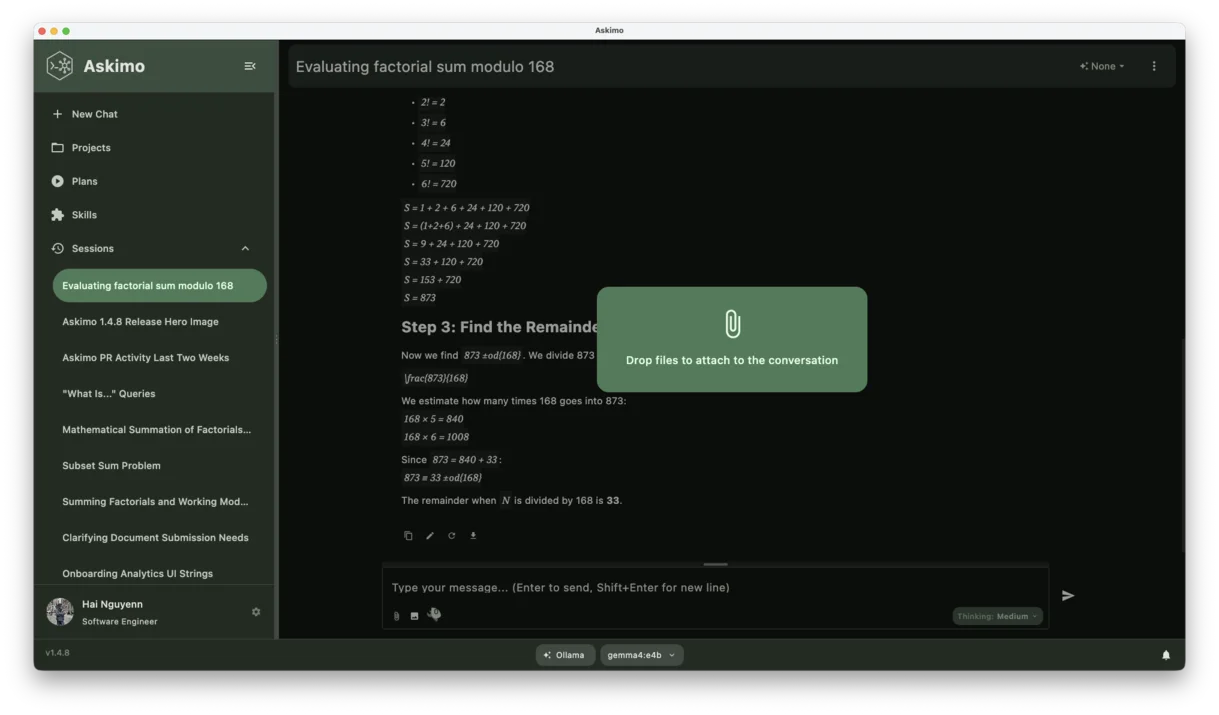
Adding files to a conversation is now as simple as dragging them into the chat window.
Askimo 1.4.8 introduces drag-and-drop file support alongside the existing file picker. You can drag documents, PDFs, spreadsheets, or code files directly from your desktop or file manager into the chat area and Askimo will attach them immediately.
This removes the extra clicks involved in opening a file dialog, which makes it more natural to include files as part of a conversation without interrupting your flow.
Supported file types include PDFs, Word and Excel documents, OpenOffice files, plain text, log files, and rich text documents.
A More Personalized Interface
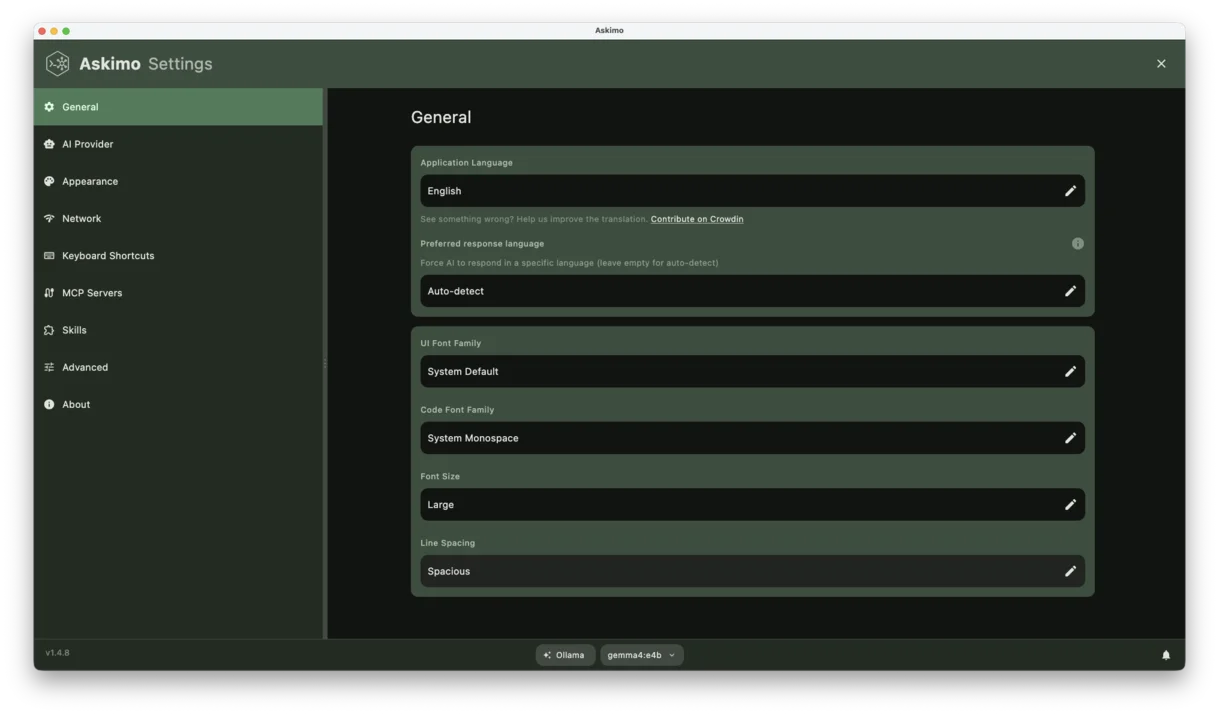
Askimo has always supported multiple visual themes, but 1.4.8 goes further with new customization options for both typography and color.
Font Settings for Code and UI Text
You can now configure separate fonts for:
- Interface text, for general labels, menus, and conversation content
- Code blocks, for technical output and inline code snippets
This is especially useful for developers who prefer a specific monospace font for reading code, or for users who find certain typefaces easier to read over long sessions.
Accent Colors and Palette Styles
Askimo 1.4.8 adds support for dynamic accent colors and palette style options that apply across the interface. You can set a custom accent color to match your own preferences or match a broader workflow setup, and choose from different palette styles that adjust how the theme maps color relationships.
These options work across all eight supported themes, including Light, Dark, Sepia, Ocean, Nord, Sage, Rose, and Indigo.
System Diagnostics and Token Usage Tracking
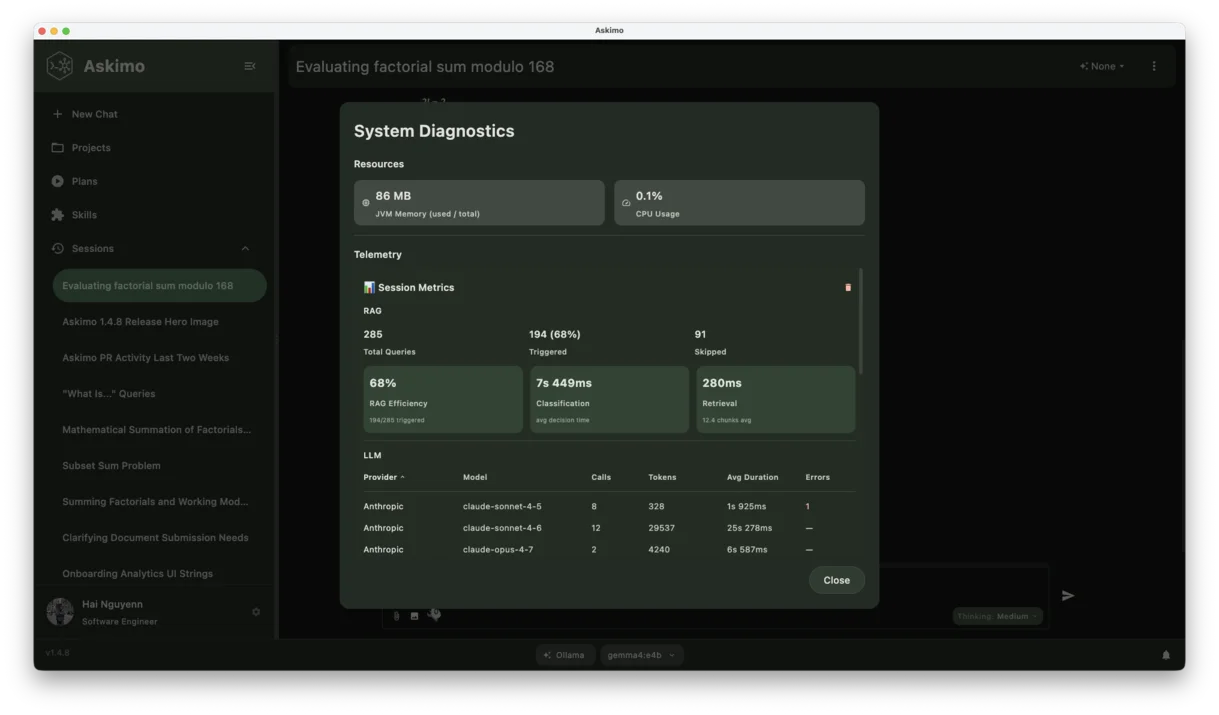
Understanding how Askimo is performing has become easier with two new visibility tools.
System Diagnostics Dialog
A new System Diagnostics dialog is now available from the Help menu. It shows:
- Live CPU and JVM memory usage
- Token consumption broken down by model and provider
- Session-level telemetry for recent conversations
This is useful when you want to understand how much resources a long session is consuming, or when you are diagnosing why a particular model is responding slowly.
Token Usage Tracking
Askimo 1.4.8 also adds token usage tracking across conversations. Token counts are displayed per message and summarized at the session level, giving you a clearer picture of how much context is being used and when you are approaching a model’s context window limit.
This is particularly helpful when working with large documents or extended conversations where context management becomes important.
Search for Projects and Sessions
Finding a specific project or past conversation is now faster.
Askimo 1.4.8 adds search functionality to both the projects list and the sessions panel. You can type to filter by name or recent content, making it easier to navigate when you have a large number of sessions or multiple active projects.
A More Consistent Visual Layout
Several internal changes in this release improve the visual consistency of the interface.
Askimo 1.4.8 migrates layout spacing to use standardized Spacing constants across all views. This means that padding, margins, and gaps between elements are now defined from a shared system rather than per-component values. The result is a more uniform visual density and a layout that feels deliberately composed rather than assembled from parts.
Scrollbar styles have also been consolidated so that every scrollable panel uses the same appearance, regardless of where it appears in the interface.
These changes are largely invisible in isolation, but they produce a noticeably more polished overall experience.
Improved Onboarding for New Users
The onboarding flow that new users see when setting up Askimo for the first time has been updated in this release.
The screen order has been optimized to introduce the most important concepts earlier, the copy has been clarified to reduce ambiguity, and several UI elements have been refreshed for consistency with the rest of the interface.
For users setting up Askimo on a new machine or for a team member, the experience is smoother and requires less guesswork to complete.
Stability and Core Improvements
Askimo 1.4.8 includes a number of improvements that are not visible as features but contribute to a more reliable daily experience.
- Docker AI model factory updated to use the legacy OpenAI API for improved compatibility with a wider range of locally hosted models
- LaTeX removed from Markdown rendering to prevent formatting issues when AI responses include mathematical notation outside of code blocks
- Localization improvements with more consistent string handling across the interface
- Telemetry updates to improve the accuracy of session and usage metrics
- Test suite stabilization to reduce flaky results and improve overall code reliability
Looking Ahead
Askimo 1.4.8 builds on the foundation of project-based RAG and file support from earlier releases, adding more precise control over AI reasoning, deeper interface customization, and better visibility into how the application is running.
These improvements are aimed at making Askimo more useful for longer sessions, more complex tasks, and more varied personal preferences. We will continue building on this work in the next release.
Thank you for using Askimo and for the feedback that shapes each version.
Support Askimo on GitHub
Askimo is an open-source AI desktop client built in Kotlin with support for OpenAI, Claude, Gemini, Ollama, Docker AI, and more.
If this release looks useful to you, please consider visiting the GitHub repository and giving it a star. Your support helps the project grow, makes it easier for others to discover Askimo, and encourages continued development.
You can also:
- Report bugs or request features through GitHub Issues
- Contribute code, documentation, or translations
- Share Askimo with developers or teams who might benefit from a local-first AI client