

 Hai Nguyen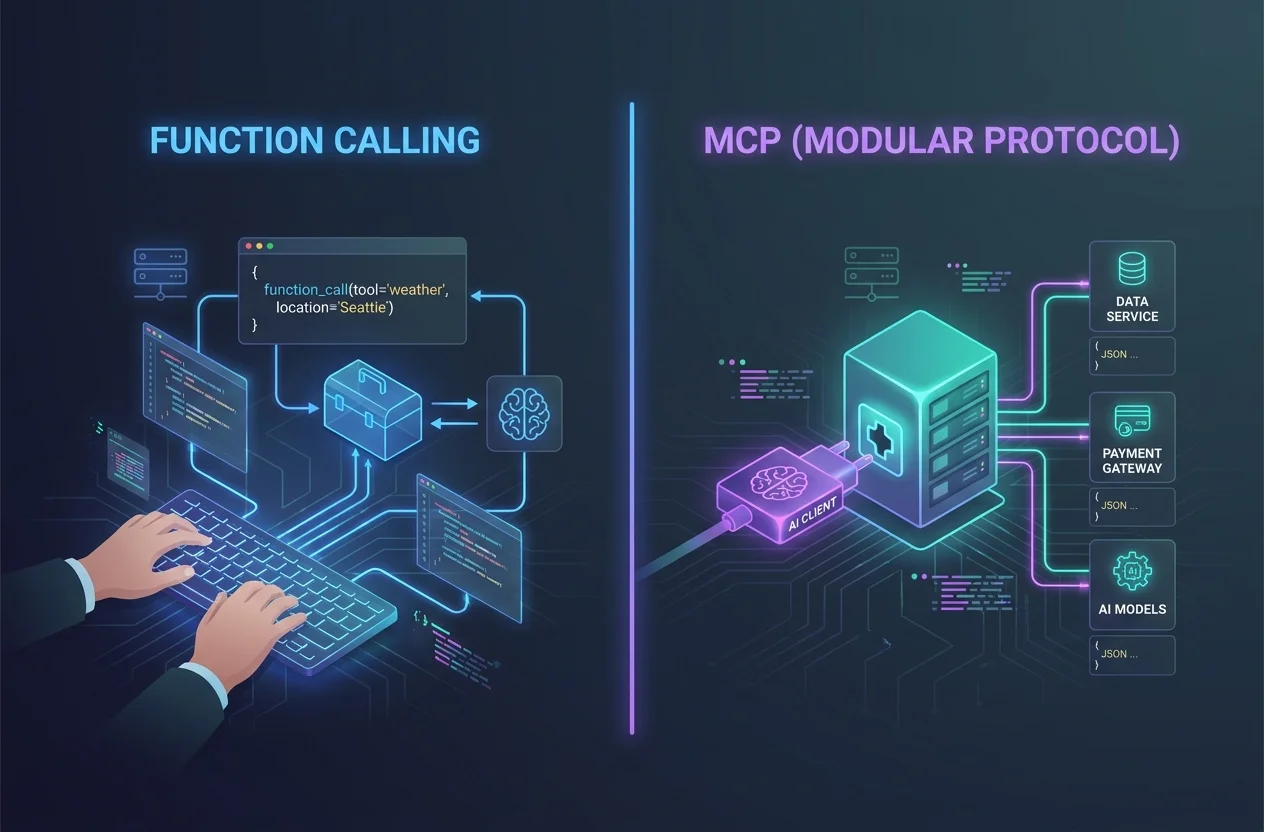
MCP (Model Context Protocol) and function calling both give AI models the ability to use tools: search the web, query a database, call an API. But they solve the problem differently, and understanding the distinction matters if you’re choosing how to build or extend an AI workflow.
Short version:
- Function calling is a contract defined per request in your code. You tell the model what tools exist, the model decides which one to call, and your code handles the execution.
- MCP is a persistent protocol. A separate server exposes tools. The AI client discovers and calls them at runtime, with no per-request definitions and no glue code.
This guide explains both clearly, compares them side by side, and helps you decide which one to reach for.
What Is Function Calling?
Function calling (also called “tool use”) is a feature built into most major AI APIs: OpenAI, Claude, Gemini, and others.
The way it works:
- You define the tools in JSON, in the API request, listing the function name, description, and parameters.
- The model decides during inference. If the model thinks a tool would help, it returns a structured response saying “call this function with these arguments” instead of a plain text answer.
- Your code executes it. Your application actually runs the function and sends the result back to the model.
- The model continues. It receives the result and generates a final response.
A simplified example using the OpenAI API:
{ "tools": [ { "type": "function", "function": { "name": "get_stock_price", "description": "Get the current price of a stock by ticker symbol", "parameters": { "type": "object", "properties": { "ticker": { "type": "string", "description": "Stock ticker, e.g. AAPL" } }, "required": ["ticker"] } } } ]}The model sees this definition, decides to call get_stock_price({ ticker: "AAPL" }), and your backend fetches the real price and feeds it back.
Key characteristic: the tool definitions live in your code. Every request carries them. You own the execution layer entirely.
What Is MCP?
MCP (Model Context Protocol) is an open standard introduced by Anthropic in late 2024 and now adopted broadly. Rather than defining tools inline per request, MCP separates tool definition and execution into a standalone server.
The way it works:
- A server exposes tools. An MCP server (a running process or remote endpoint) advertises what tools it has: names, descriptions, parameters.
- The AI client connects once, at startup or on demand, and discovers the tools the server exposes.
- The model calls tools using the same inference-time decision as function calling. The model picks a tool and provides arguments.
- The MCP server executes. The client routes the call to the server. The server runs the logic and returns the result.
graph LR User -->|chat| Client[AI Client\ne.g. Askimo] Client -->|tool call| MCP[MCP Server\ne.g. GitHub / SQLite / Web Search] MCP -->|result| Client Client -->|response| UserKey characteristic: tool logic lives in the MCP server, not in your application code. The client just connects and lets the model use whatever tools the server exposes.
Side-by-Side Comparison
| Function Calling | MCP | |
|---|---|---|
| Where tools are defined | In your code, per request | In a separate MCP server |
| Who executes the tool | Your application | The MCP server |
| Setup | Code-level: define JSON schema, handle results | Config-level: add server URL or command |
| Reusability | Tools are specific to your app | Any MCP-compatible client can connect |
| Discovery | Manual: you list every tool | Automatic: client asks server what it exposes |
| Transport | API call (HTTP/JSON) | Stdio or HTTP (MCP protocol) |
| Ecosystem | Provider-specific (OpenAI tools, Claude tools) | Open standard, growing library of servers |
| Best for | Custom business logic tightly coupled to your app | Connecting to existing services and infrastructure |
The Core Conceptual Difference
Think of it this way:
Function calling is like handing an employee a printed job description every morning. “Today you can use these tools, here’s how each one works.” If the tools change, you reprint the sheet. The employee does the work, reports back, and you manage everything.
MCP is like giving the employee a key to a workshop. They walk in, look around, see what tools are available, and use what they need. The workshop is always there. Someone else maintains it. You just hand over the key.
When to Use Function Calling
Function calling is the right choice when:
- You’re building a custom application. The tools are bespoke business logic that don’t exist as MCP servers and you don’t want to build one.
- You need tight control over execution. You want to validate inputs, apply rate limits, log calls, or handle errors in your own code.
- The tools are simple and few. One or two functions that are easy to define inline and unlikely to change often.
- You’re using an SDK that abstracts it. Many AI SDKs (LangChain, LlamaIndex, Vercel AI SDK) have good function calling abstractions that remove most of the boilerplate.
- You’re not using a client that supports MCP. If your tooling doesn’t support MCP yet, function calling is the universal fallback.
A good example: you’re building a customer support bot and want it to call your internal lookup_order(order_id) API. That API is yours, it’s not a general tool, and you want to own the execution. Function calling is the clean choice.
When to Use MCP
MCP is the right choice when:
- You want to connect to existing services. GitHub, SQLite, Postgres, web search, local file systems all have maintained MCP servers. You just connect.
- You don’t want to write glue code. With MCP, connecting your AI to GitHub means adding a server URL and a token. Not writing a function, not handling responses, not maintaining schemas.
- You want tools to be reusable across clients. An MCP server you set up once works with any MCP-compatible client: Askimo, Claude Desktop, Cursor, and any future tools that adopt the standard.
- Tool sets change over time. MCP servers expose tools dynamically. Add a new tool to the server and every connected client picks it up automatically.
- You want full local privacy. MCP servers can run entirely on your machine, alongside a local model like Ollama. No data ever leaves your device.
- You’re not a developer. You want GitHub integration in your AI chat without writing any code. Connect, configure, done.
A good example: you want your AI to check open pull requests while you chat, query a local SQLite database in plain English, and search the web for current news, all in one conversation. With MCP, that’s three server connections and five minutes of setup.
Can You Use Both Together?
Yes, and they complement each other well.
Many applications use MCP for infrastructure-level tools (databases, APIs, file systems) and function calling for application-specific logic that doesn’t belong in a shared server.
For instance, an engineering assistant might use:
- MCP for GitHub (existing server) and web search (existing server)
- Function calling for an internal deployment API that’s specific to your infrastructure
The AI sees all tools equally and picks the right one regardless of how it’s exposed.
How Askimo Handles Both
Askimo Desktop supports MCP natively. Connect any MCP server in Settings and the AI starts using it in conversations immediately, with no code required.
The built-in tool support (file reading, script execution, URL crawling) works similarly to function calling under the hood, with tool logic managed by the app and transparent to you.
You can layer both: connect a GitHub MCP server for repository access and use Askimo’s built-in URL tool for fetching web content, all within the same conversation.
MCP works across every provider Askimo supports: Claude, GPT, Gemini, and fully local Ollama models. For a fully private setup with a local model and local MCP servers, nothing leaves your machine.
Set up MCP in Askimo: How to Connect AI to Real-World Tools with MCP in Askimo Desktop
Quick Decision Guide
Use function calling if:
- You’re writing an application and the tool is custom business logic
- You need fine-grained control over execution and error handling
- The tool doesn’t exist as an MCP server and building one would be overkill
Use MCP if:
- The service you want (GitHub, databases, files, web search) already has an MCP server
- You want tools to work across multiple AI clients without redefining them
- You want to connect AI to tools without writing code
- You’re prioritizing local/private workflows with Ollama
Use both if:
- You’re building a serious workflow that needs both infrastructure access and custom logic
The Ecosystem Is Moving Toward MCP
Function calling will always have a place. Custom logic needs to live somewhere. But the general trend is clear: the MCP ecosystem is growing fast.
Hundreds of open-source MCP servers now exist for almost every common service. The major AI providers are adopting the standard. Developer tools (IDEs, terminals, notebooks) are adding MCP support. What started as an Anthropic proposal is becoming the standard layer between AI models and the real world.
If you’re connecting AI to well-known services, MCP will almost always be the lower-effort and more maintainable path.
Further Reading
- MCP Integration in Askimo Desktop: step-by-step setup for GitHub, databases, local files, and web search
- Chat With Your Documents Using Ollama & RAG: local AI over your own documents, no cloud required
- AI Plans vs AI Agents: when structured multi-step workflows beat autonomous agents
- modelcontextprotocol.io: official MCP specification and server registry
Try Askimo today: 👉 https://askimo.chat
Star on GitHub: 👉 https://github.com/askimo-ai/askimo