

 Hai Nguyen
Askimo 1.5.4 Is Now Available
Askimo 1.5.4 is a big one for anyone who wants to run AI fully on their own terms. This release adds support for local LLM engines, full voice input and output powered by Whisper, and a round of improvements to inline suggestions, memory handling, and desktop reliability.
If you’ve been waiting for a way to talk to Askimo instead of typing, or to run local models through your own engine of choice, this is the release for you.
New to running models locally? Read: Askimo: Ollama Desktop App & GUI for Llama 3, DeepSeek, Mistral & Local AI Models
1. A Built-In Local LLM Engine, With Full Control
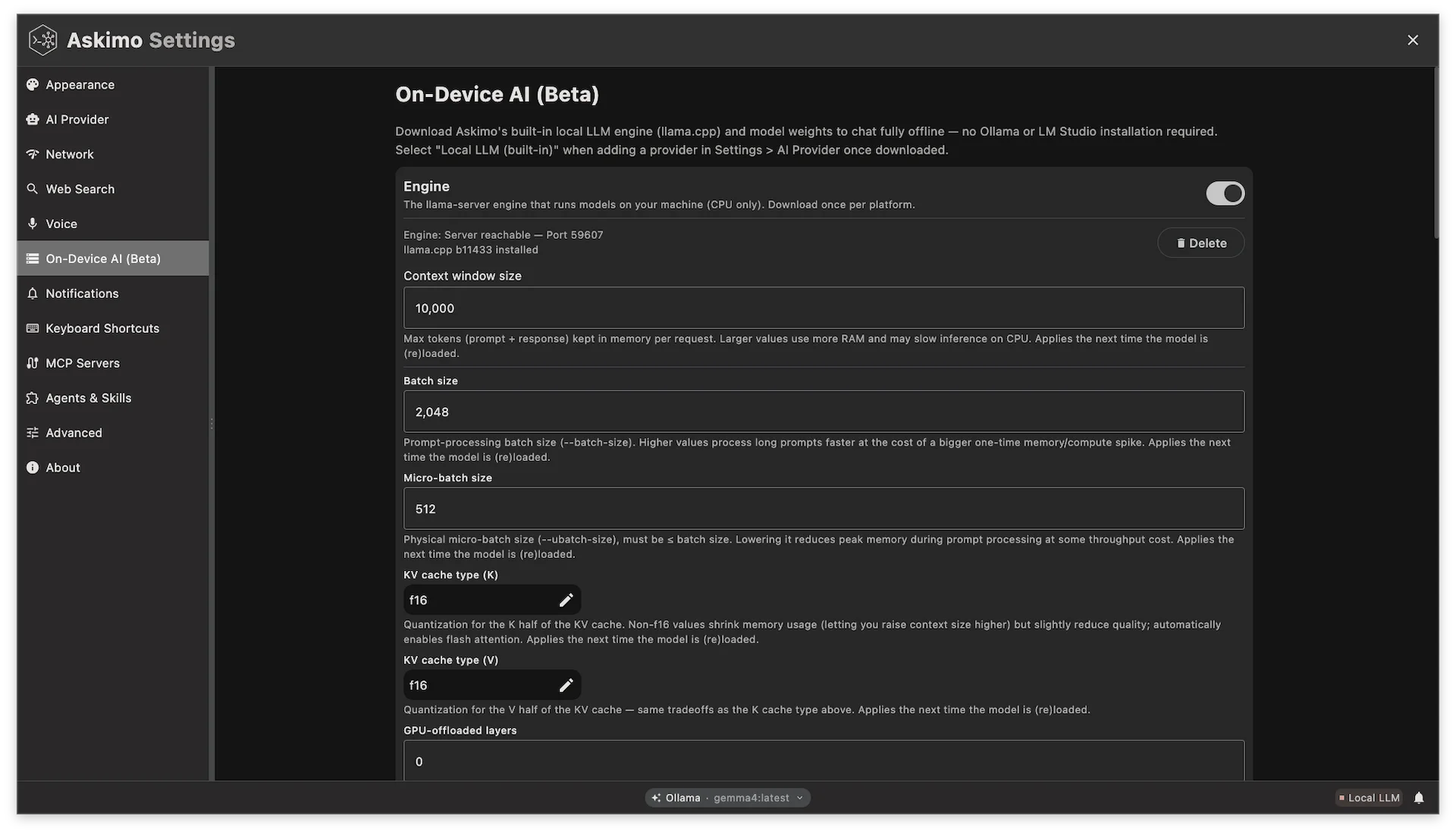
Askimo has always supported local AI through external engines like Ollama and LM Studio, and that’s not going away. But those engines make a trade-off for simplicity: they hide the underlying llama.cpp settings, so there’s no easy way to tune context size, batch size, KV cache quantization, flash attention, or thread/GPU layer counts for your specific hardware.
Advanced users kept asking for that control, so Askimo 1.5.4 introduces a built-in local LLM engine that runs llama-server directly, managed entirely inside the app:
- Fine-grained tuning - set context size, batch/ubatch size, KV cache type (K/V), flash attention mode, thread count, NUMA mode, and more from Settings, instead of accepting an engine’s defaults.
- Full lifecycle control - Askimo starts, stops, swaps, and auto-unloads idle
llama-serverprocesses for you, with separate chat and embedding slots so indexing a project never stalls an in-flight chat response. - Models straight from Hugging Face - browse and download any
.ggufmodel directly from Hugging Face’s catalog (not a fixed curated list), and Askimo loads it on demand the moment you reference it.
This sits alongside, not instead of, Askimo’s existing Ollama support and project-aware RAG with local models - so whether you want a zero-config external engine or hands-on control over every llama.cpp flag, Askimo now covers both.
For a closer look at the Hugging Face model browser and why this means Ollama and LM Studio are now optional, read Run Local AI Without Ollama or LM Studio: Askimo’s Built-in LLM.
2. Voice: Whisper Transcription and Text-to-Speech
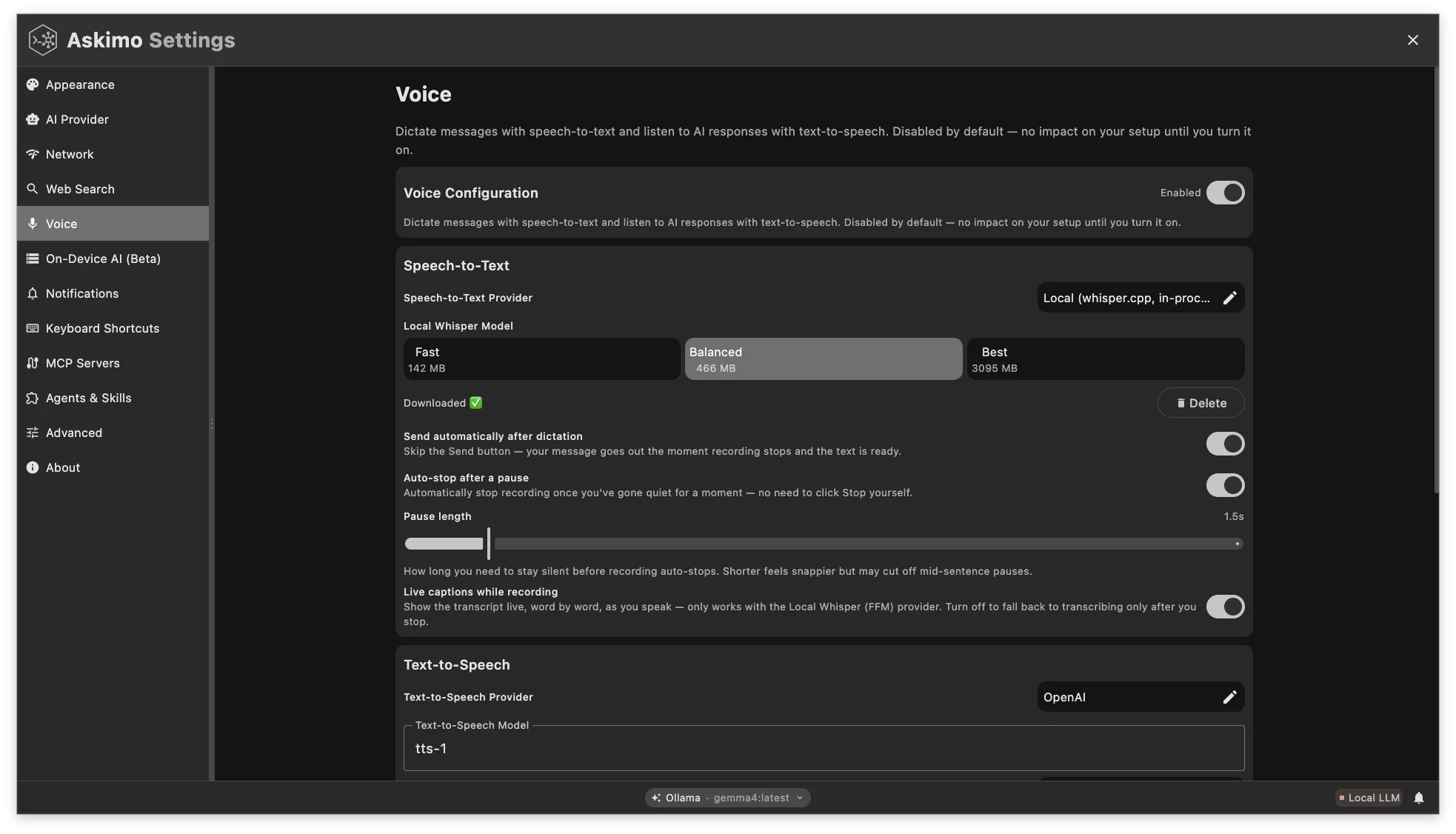
Askimo already let you speak to it and have it speak back: speech-to-text via OpenAI or a local Whisper server, and text-to-speech via OpenAI or Piper. OpenAI’s models are excellent, but they’re a cloud call on every sentence - we wanted a solution that’s just as usable without sending audio to a third party or paying per request.
That’s why this release adds a fully embedded whisper.cpp integration for speech-to-text, running entirely on-device. On top of that, it unlocks live transcription: your speech is turned into text in real time as you talk, with a new toggle in the UI so you can switch between typing and talking whenever it suits the conversation - something a round-trip to a cloud server can’t do as smoothly. Downloading a Whisper model for the first time no longer locks you into waiting it out, either - you can now cancel large model downloads mid-way if you change your mind or picked the wrong size.
We made the same call on the output side: alongside OpenAI and Piper, a new SystemTextToSpeech provider reads responses back to you using your system’s native voices - another zero-cost, fully local option with no extra setup.
Underneath both directions, this release also fixes race conditions in recording snapshots and improves cancellation handling, so starting, stopping, and interrupting a voice session behaves the way you’d expect instead of occasionally getting stuck mid-recording.
Together, these changes make voice a genuinely usable second input/output mode in Askimo - cloud-quality when you want it, fully local and free when you don’t.
3. Smarter Inline Suggestions
Inline typing suggestions got a round of tuning in this release: refined matching logic and usage history tracking make autocomplete suggest things that are actually relevant to what you tend to type, instead of generic completions.
Memory and summarization logic was also optimized for better retention and efficiency, so longer conversations hold onto the context that matters without unnecessary overhead.
4. Reliability and Desktop Improvements
A number of changes in this release are about Askimo holding up better under real-world use rather than adding a new surface feature:
- Tool calls no longer get stuck waiting forever - if a tool request times out waiting for your approval, Askimo now backs out cleanly instead of hanging indefinitely
- Fewer silent failures - improved error handling and reporting mean issues are caught and surfaced instead of failing quietly in the background
- Smoother, more reliable installs on macOS, thanks to signing fixes and an updated release pipeline
- No more antivirus false positives on Windows - saved credentials are now read and written through a native library instead of spawning a PowerShell process every time, which some antivirus tools were flagging as suspicious
- Chat UI/UX tweaks, keymap handling improvements, and new community forum links built into the app
- A tidier sidebar - better hover sizing, and empty sessions no longer clutter the list with blank headers
- Easier model discovery in the LLM Browser, plus support for more languages
- More reliable OpenRouter embeddings - models now resolve from a dedicated catalog, reducing lookup failures
Final Thoughts
Askimo 1.5.4 pushes further into local-first AI: your own LLM engine, your own voice, running on your own machine. Combined with the smarter suggestions and the reliability work across the app, this release is about making day-to-day use feel more natural and less fiddly.
Thanks to everyone who contributed code, testing, and feedback to this release.
If you try the update and have feedback, the project is open source:
- GitHub: https://github.com/askimo-ai/askimo
- Forum: https://askimo.chat/forum
- Docs: https://askimo.chat/docs