

 Hai Nguyen
Askimo can now run local models entirely on its own. Settings > Local LLM downloads a platform-matching llama-server binary and lets you search Hugging Face for .gguf chat and embedding models, download them, and start chatting. No Ollama, no LM Studio, nothing else to install.
This has been the last real gap for people who wanted local inference in Askimo but didn’t want to manage a separate runtime. Now it’s one toggle and a model picker, built into the app.
Already using Ollama with Askimo? It still works exactly the same. See Askimo: Ollama Desktop App & GUI for Llama 3, DeepSeek, Mistral & Local AI Models: the built-in engine is a new option alongside it, not a replacement you’re forced into. For the full list of what shipped alongside it, see the Askimo 1.5.4 release notes.
If you’re new to Askimo, start here:
- Download: https://askimo.chat/download
- Docs: https://askimo.chat/docs/
- Providers setup: https://askimo.chat/docs/desktop/ai-providers/
1. One Toggle Installs the Engine
Settings > Local LLM has a single switch for the engine itself. Flip it on and Askimo downloads the llama-server binary that matches your OS and architecture, the same “enable it, setup happens automatically” pattern as Ollama, LM Studio, or Docker Model Runner. Flip it off and Askimo stops the running server and removes the binary.
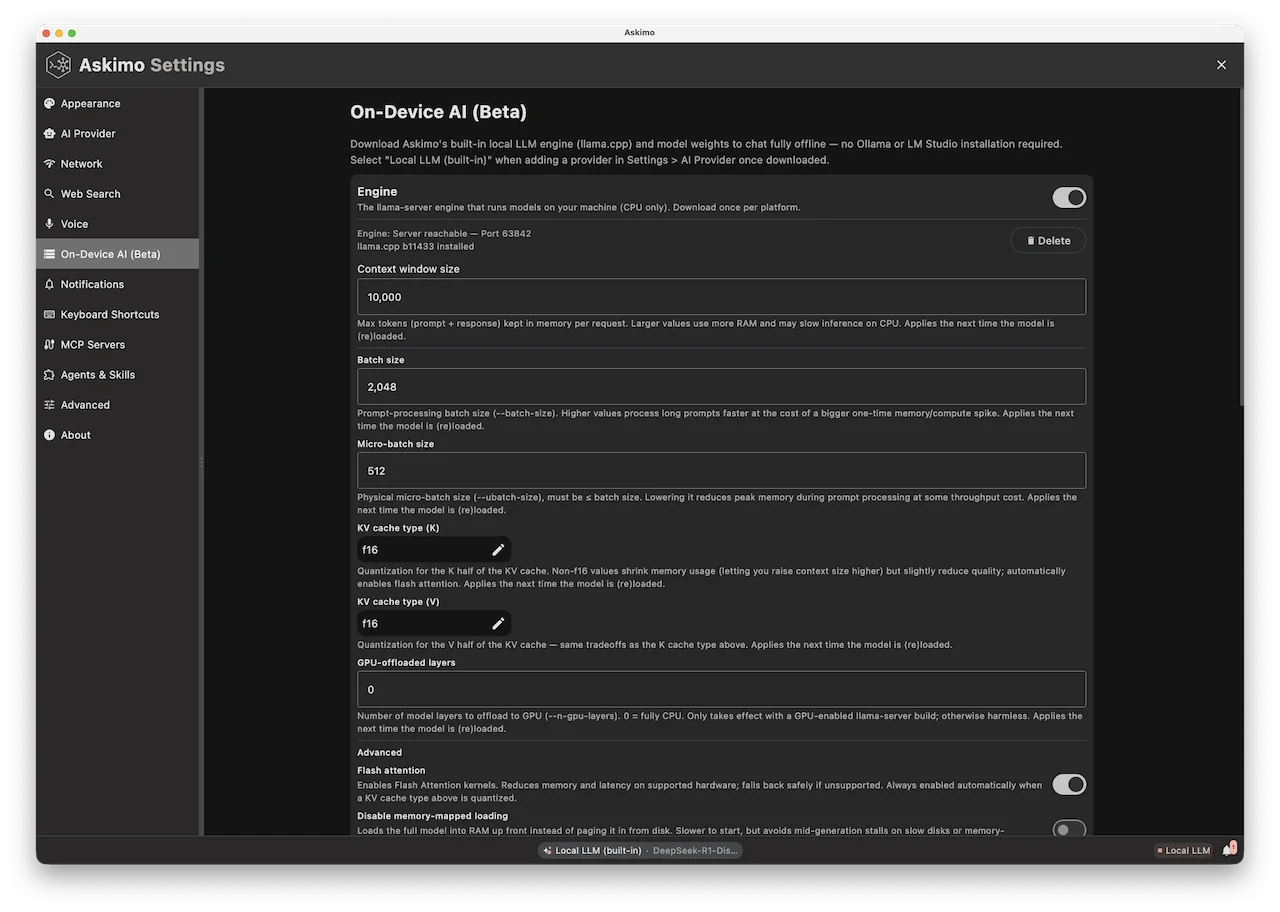
There’s no separate app to install, no PATH to configure, and no service to keep running in the background when you’re not using it. The engine only starts when Askimo needs it.
2. Download Hugging Face GGUF Models Directly
Once the engine is on, the Models section shows Hugging Face’s most-downloaded GGUF repos by default, with a search box for anything more specific. Each result lists the repo, file name, size, downloads, and likes, pulled live from the Hugging Face API, not a hardcoded list that goes stale the week a better quantization ships.
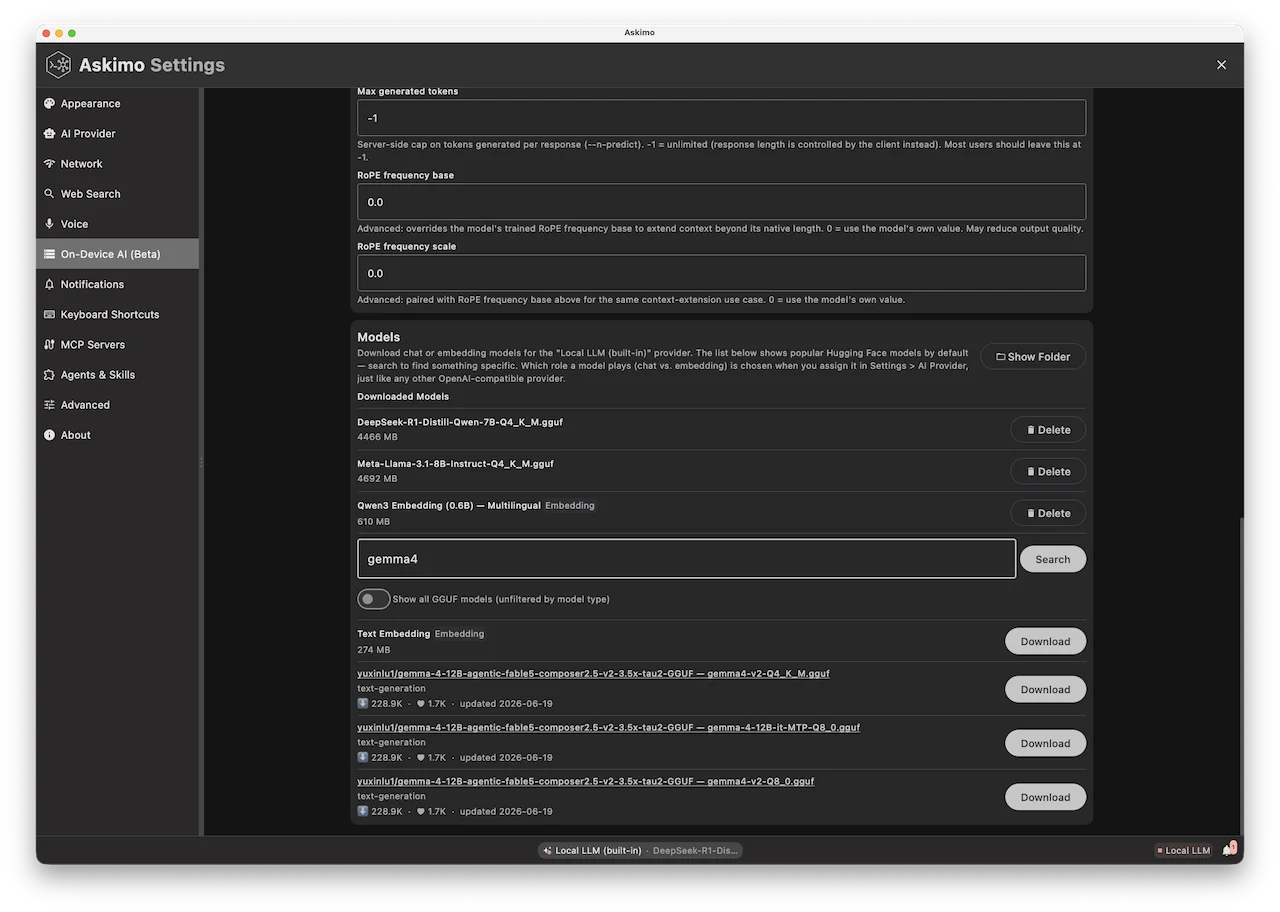
Pick a result and Askimo downloads the .gguf file straight from Hugging Face into its local models folder. From there it shows up like any other model in the “Local LLM (built-in)” provider’s model picker, under Settings > AI Provider.
Chat models are deliberately not curated by Askimo: any .gguf chat model works the same way through llama-server, so there’s no correctness reason to hand-maintain a list. Embedding models are the one exception: Askimo ships two vetted entries (nomic-embed-text and Qwen3-Embedding) because getting the pooling strategy wrong for an embedding model silently crashes rather than just degrading quality, and that’s not something worth guessing from Hugging Face’s metadata.
3. No More Ollama or LM Studio
This is the headline change: Askimo’s built-in provider removes the dependency on a third-party runtime entirely. You still can use Ollama or LM Studio if you prefer (Askimo keeps supporting both), but you no longer have to install anything outside Askimo to get local inference working.
For people onboarding teammates who’ve never touched local AI before, that’s a real difference. “Download Askimo, flip a switch, pick a model” is a much shorter path than “install Ollama, learn its CLI, pull a model, then configure Askimo to point at it.”
4. Advanced Users Keep Direct Access to llama-server Flags
The defaults above are tuned to work out of the box, but Askimo doesn’t hide llama-server behind a black box. Because Askimo manages the llama-server process directly instead of going through Ollama’s own wrapper, the full set of llama-server runtime flags is exposed as configuration, with no extra daemon or config file format to learn. A few examples:
- Context size (
--ctx-size): cap or raise how much conversation history and RAG context a model can hold, independent of the model’s native training context. - GPU offload (
--n-gpu-layers): push more or fewer transformer layers onto the GPU once a GPU-enabled build is in play, trading VRAM for speed. - KV-cache quantization (
--cache-type-k,--cache-type-v): quantize the key/value cache (e.g.q8_0instead off16) to cut memory use on long contexts, with flash attention enabled automatically whenever it’s required for correctness. - Batching (
--batch-size,--ubatch-size,--parallel,--cont-batching): tune prompt-processing throughput and run multiple requests concurrently against one model. - Memory behavior (
--no-mmap,--mlock): control whether the model is memory-mapped or pinned in RAM, useful on machines with tight or very large memory budgets. - RoPE scaling (
--rope-freq-base,--rope-freq-scale): adjust rotary position embedding parameters for models using extended-context tricks.
This is the trade Ollama’s own CLI wrapper and LM Studio’s GUI don’t make as directly: they cover the common cases well, but tucking the server away behind a higher-level interface means some llama.cpp flags are unavailable or harder to reach. Askimo’s built-in engine passes these through from Settings > Local LLM, so the same knobs people already tune when running llama-server by hand are available without leaving the app.
5. One Process Manager, Chat and Embeddings Separately
Under the hood, Askimo runs up to two llama-server child processes at once, one for chat, one for embeddings, each with its own port and lifecycle. That matters in practice: a RAG indexing job generating embeddings in the background won’t stall a chat response you’re waiting on, because they’re never fighting over the same process.
A small reverse proxy in front of both slots reads the model field off each incoming request and routes it to the right slot, swapping the loaded .gguf file if you switch models mid-session. Idle processes unload automatically after a few minutes to free up RAM, and reload the next time you send a request.
6. Connecting to the Local LLM Server
The built-in engine shows up in Settings > AI Provider as Local LLM (built-in), configured like any other OpenAI-compatible provider: it points at http://127.0.0.1/v1, needs no API key, and talks the standard chat completions API. Under the hood that’s the same reverse proxy from the previous section, sitting in front of whichever llama-server process is currently running.
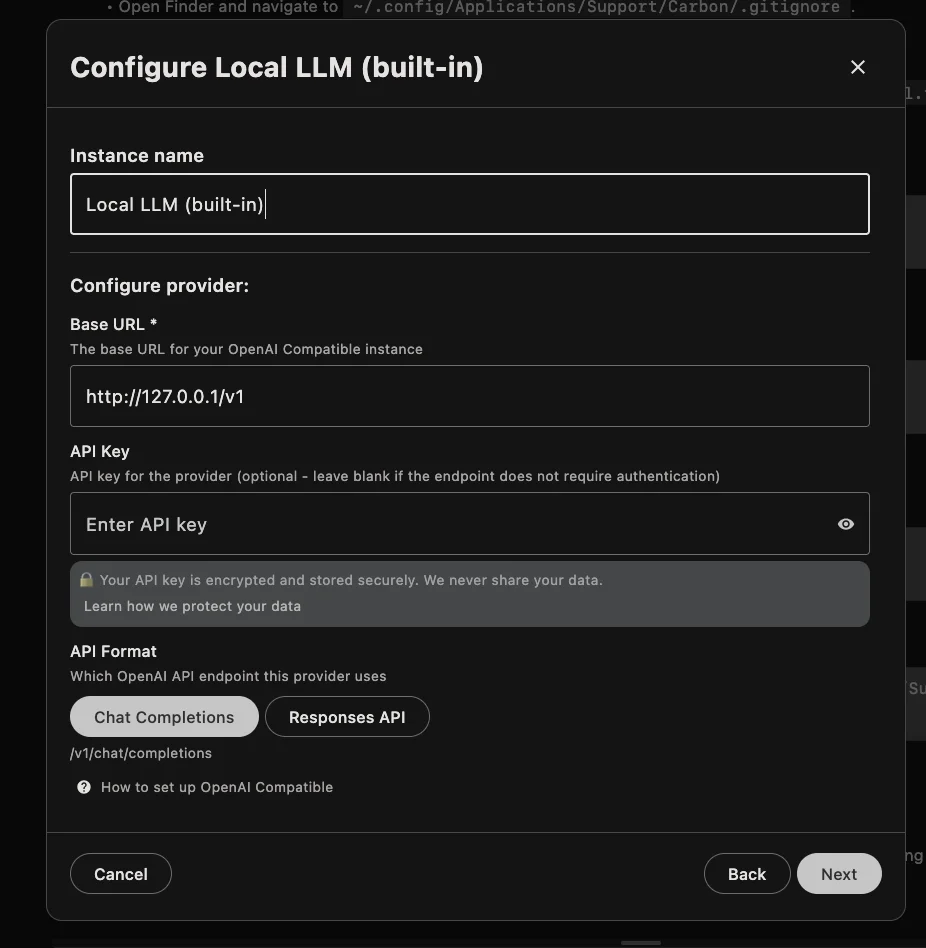
The flow is three steps: open the model picker, start (or let Askimo auto-start) the llama-server process for the model you want, then select that provider and model like you would OpenAI or Anthropic. From there it’s a normal Askimo chat, just backed by a model running entirely on your machine.
How It Compares to Ollama and LM Studio
| Askimo (built-in) | Ollama | LM Studio | |
|---|---|---|---|
| Separate install required | No | Yes | Yes |
| Model source | Hugging Face GGUF, searched live | Ollama’s own model library | Hugging Face GGUF |
| Runtime | llama-server (llama.cpp), managed by Askimo |
Ollama’s own llama.cpp fork |
llama.cpp (and MLX on Apple Silicon) |
Advanced llama-server flags (ctx size, GPU layers, KV-cache quant, batching, RoPE scaling) |
Yes, exposed directly | Limited, wrapped by Ollama’s CLI | Limited, wrapped by the GUI |
| Chat UI | Askimo | None built-in (needs a separate client) | Built-in, limited to local models |
| Multi-provider chat (cloud + local in one place) | Yes | No | No |
If you already run Ollama or LM Studio, nothing changes for you. Both keep working as providers in Askimo. The built-in engine mainly removes the “install something else first” step for anyone setting up local AI for the first time.
Final thoughts
Local inference in Askimo used to mean “go set up Ollama first.” Now it’s part of the app: one toggle to get the engine, one search box to find a model on Hugging Face, one click to download it. Ollama and LM Studio are still fully supported if that’s your existing setup. This just removes the requirement for anyone starting fresh.
If you try it out and hit a model that won’t load or a quantization that should be preferred over another, open an issue. The project is open source: